Skip to content
Education and STEM

Digital tools for workshops and learning. For non-profits, schools and museums.

We turn workshop material into an app, a game or a video that guides children step by step. The facilitator has more time for the group, and the content stays after the workshop.

Challenge

Lots of children, little time.

What we do

From learning material to tools children use on their own.

  • 01

    Workshop apps

    A web app on a phone or tablet, with nothing to install: assembly, checks and exercises, step by step.

  • 02

    Interactive content and games

    3D models that rotate and come apart, simulators, quizzes and tasks with visible progress.

  • 03

    Video

    Short instructional videos and project presentations for the web, social media and reporting.

  • 04

    Digitising workshops

    We turn existing instructions, worksheets and exercises into a digital flow the facilitator can repeat with a new group.

  • 05

    The digital part of EU projects

    For EU and ESF+ calls we help describe the digital activities and results, and we build them during implementation.

Examples

Built for workshops and learning.

Each example shows the challenge, the solution and what remained as the result.

From the project · STEM app

Dronovi STEM

Accelerator for a Sustainable Society2026

Challenge
At a STEM workshop, children build a real wooden drone. The paper instructions are small and complicated, and the drone has to be assembled and checked properly before its first flight.
Solution
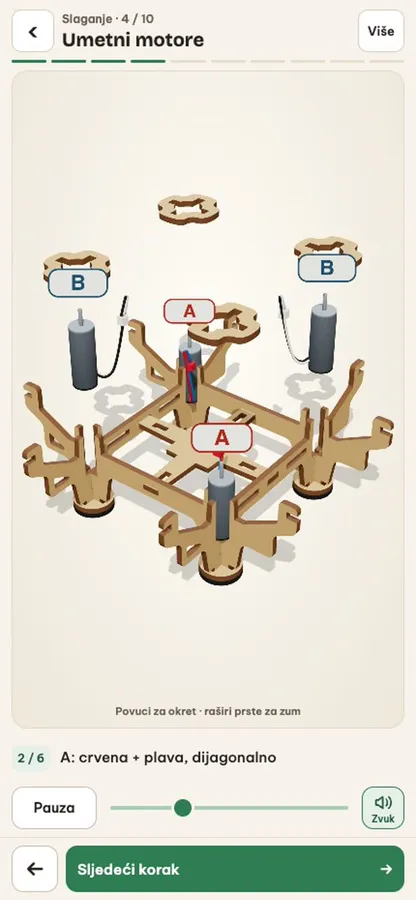
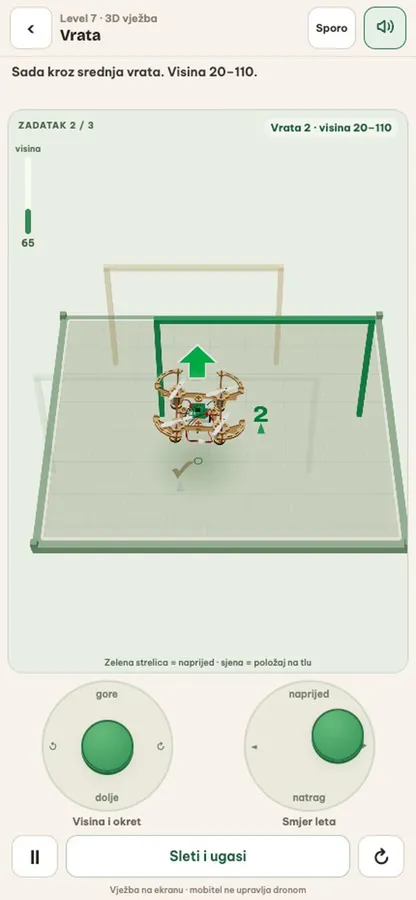
A web app guides them through assembling the drone and the remote control in 3D, with short check questions, then through a pre-flight check and flying exercises in a simulator.
Result
The whole workshop in one app: 10 steps to assemble the drone, 8 steps for the remote control and 13 exercises in the simulator, on a phone or tablet.
See the project →
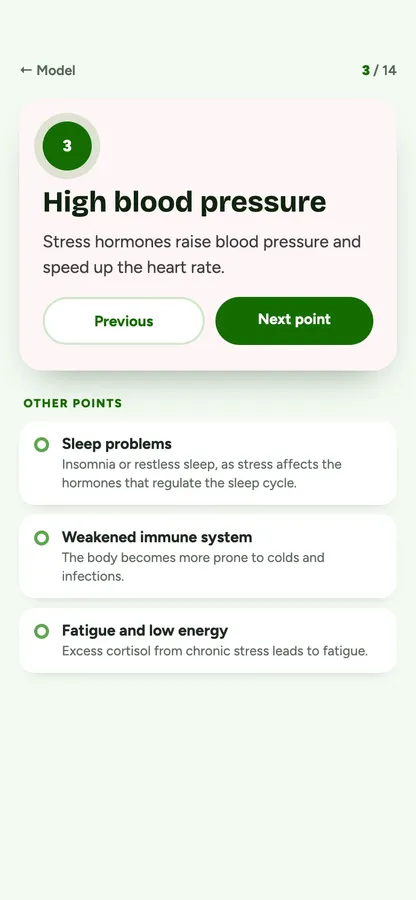
How stress affects the body: screen illustration
Illustration · model and texts from the project
From the project · Interactive 3D model

How stress affects the body

Lamaro digital2022

Challenge
A project about stress needed a simple, clear way to show how stress affects the body, with content that also works offline.
Solution
We adapted a 3D body model for the web browser and placed points where the symptoms appear: headache, digestion, sleep, immunity, blood pressure. Tapping a point opens a short explanation prepared by the client.
Result
The whole topic on one model that rotates and zooms, on a phone or computer, also offline.
From the project · History through play · 3D model

Mrsunjski Lug

Meridiana Slavonica2026

Challenge
The medieval fortress at Mrsunjski Lug has left no visible traces on the ground. Pupils find it hard to imagine what it looked like and how it was built, and a text about the site can’t show them.
Solution
A 3D model of the fortress’s possible appearance, with points that separate what is documented from what is reconstruction. Then a game: pupils build the earthwork, the wooden palisade, the bridges and the houses themselves.
Result
History is built rather than read, and along the way pupils see how finds turn into a picture of the past. The same content works on a phone and on a large touch screen in the museum, so a whole school group can use it. It is based on material from the Brod Posavina Museum.
More about heritage games →
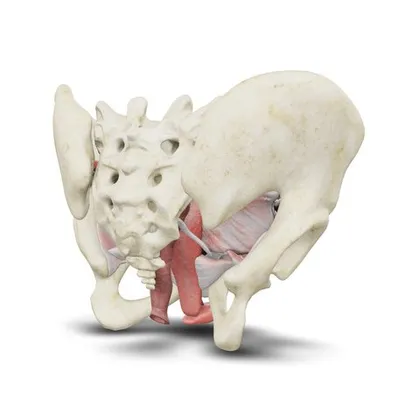
Anatomical pelvis model
Try it yourself

3D and AR for teaching.

The model rotates and zooms, and in augmented reality it stands on the desk in front of the learner. It opens in the browser, with nothing to install.

3D model example Anatomical pelvis model

Open the 3D model ↗
How we work together

From the first idea to the workshop.

  1. 01

    Conversation

    The material, the children’s age, the length of the workshop and the equipment you have.

  2. 02

    Proposal

    What goes into the app, game or video. For an EU project, also a description of the digital part of the application.

  3. 03

    Production

    A web app with nothing to install, in Croatian and other languages as needed. You review it at every stage.

  4. 04

    Workshop

    Facilitators get short instructions, and the content can be used again with the next groups.

Frequently asked questions

Does the app need to be installed?

No. The app runs in the browser on a phone, tablet or computer. Children open a link or scan a QR code.

Can you take part in an ESF+ application?

Yes. We help prepare the digital part of the application: the activities, the results and the procurement specification. Our role in the project, external contractor or partner, is agreed according to the call’s conditions.

Can we order just a video or a single game?

Yes. We make each part separately too, and it can later be combined into a larger whole.

What affects the price?

The scope of the material, the number of steps and exercises, 3D models, languages and video. We give the price in a quote, after a short conversation.

Preparing a workshop or an EU project?

Tell us what the workshop is about and who it is for. We’ll suggest a digital part that guides children step by step.